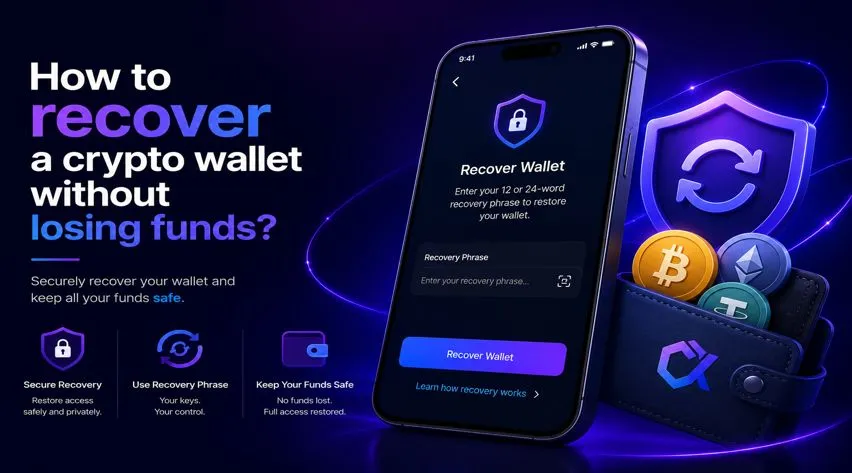

There’s nothing more stressful than losing access to your wallet, especially when you have stored significant funds or highly valuable digital assets in it. However, individuals with access to the Secret Recovery Phrase of their wallets are found to be pretty relaxed during any such situations. In case you have just forgotten your wallet password/PIN, you can easily recover your assets using the seed phrase.
However, if you have misplaced the seed phrase or cannot recall it, recovery would be impossible until you come up with the correct seed phrase.
When should you recover your crypto wallet?
There are situations such as the following when you might need to recover your crypto wallet:
- Forgotten wallet password
- Switched devices
- Lost access to your wallet application
- Accidentally deleted important files
No matter what led you to recover your wallet, you can find the complete details on how to recover a crypto wallet without losing funds.
Before anything else, get ready with the following details
On losing access to their wallets, many users assume that they have lost their funds forever. But this is not the case. However, the fact is that knowing exactly which information you have determines which process are you going to follow for recovering your wallet without losing any funds. Here are the details to look out for:
Your recovery phrase
- Wallet password or PIN
- Backup files
- Original device
- Access to linked email accounts
- Hardware wallet device
Recover your crypto wallet using the seed phrase
If you have the seed phrase of your wallet, there cannot be anything more valuable than that. In such scenarios, all you need to do is follow the steps furnished below to know how the process works:
- You can begin by downloading the official wallet application (if you do not have it already).
- Make sure you install the wallet app only from the official sources.
- Open the homepage of the wallet and choose one of the wallet recovery options from:
- Restore Wallet
- Import Wallet
- Recover Existing Wallet
- Thereafter, provide the correct seed phrase of the wallet without any typos.
- As soon as you provide the correct seed phrase, your balance will be restored.
Common mistakes to avoid permanent loss during wallet recovery
If you are really keen on to knowing how to recover a wallet without losing funds, then you must keep the following things in your mind and avoid any kind of permanent loss. Since wallet recovery requires caution, you may want to avoid these costly errors:
- Seed phrase safety: During wallet recovery, you might come across platforms that offer you seed phrase recovery solutions. However, you need to make sure that you do not share your seed phrase on support websites, exchanges, or wallet companies other than the official platforms.
- Don’t use unofficial recovery tools: When your wallet becomes inaccessible, you might come across platforms that claim to recover your wallet. However, you should not trust such platforms as they can easily drain your funds.
- Not staying patient: In moments of frustration and vulnerability, you might enter an incorrect recovery phrase multiple times. However, you must take your time, relax, and then enter each word carefully so that you do not get locked out of your wallet due to failed attempts.
Can you recover a wallet without a seed phrase?
Wallet recovery becomes pretty impossible if you do not have the correct seed phrase with you. In that scenario, what you can do is:
- Try to access the wallet on the original device you’ve set up the wallet on.
- Look out for the wallet backup files.
- Try to recover the stored passwords.
- If you have any, use the hardware wallet backups.
Note: If you are using a non-custodial wallet and you’re unable to recall the seed phrase, then you can use the specialized seed phrase recovery tool available in the CieldX wallet app. This feature of the wallet helps when one word is missing from the seed phrase.
What is CieldX Wallet and its “seed phrase recovery” feature?
By using the specialized feature of the CieldX wallet, you can easily recover one or two missing words of the seed phrase of your wallet. This feature works for wallets such as MetaMask, Coinbase Wallet, Atomic Wallet, Exodus, Trust Wallet, and more. Here is how the process works:
- Download CieldX: Visit the official CieldX website and install the desktop app on your Windows or Mac device. Avoid downloading from third-party sources.
- Create a wallet: Open the app, select Create Wallet, and set up a secure PIN.
- Select Seed Phrase Recovery: From the menu, choose the One Missing recovery option.
- Enter your seed phrase: Input all known seed phrase words and replace the missing word with “????”
- Search for the missing word: Click Search Combinations to generate possible matches and test the suggested results.
- Secure your recovery phrase: Once the correct phrase is identified, store it safely in an offline location.
If you are not using the CieldX Wallet already, you can go to the official website of CieldX and click the “download for Windows” or “download for MacOS” option.
Final words:
Recovering a cryptocurrency wallet without losing funds is often possible when you have access to your recovery phrase, backup files, or original device. The most important factor is remaining cautious throughout the process and avoiding scams that target users during recovery attempts. Remember that cryptocurrency funds remain on the blockchain even if your wallet application disappears. In most cases, successful recovery is simply a matter of restoring access to the correct private keys.
FAQs:
Can I recover my wallet without a seed phrase?
Recovery may be possible with backups or the original device, but it is often difficult without a seed phrase.
Will I lose my funds if I uninstall my wallet app?
No, your funds remain on the blockchain and can be accessed by restoring your wallet.
Is it safe to share my recovery phrase with customer support?
No, you should never share your recovery phrase with anyone.
How long does crypto wallet recovery take?
Most wallet recoveries take only a few minutes if you have the correct recovery information.
Can a hardware wallet be recovered if it is damaged?
Yes, you can restore your wallet on a replacement device using the original recovery phrase.
What happens if I enter the wrong recovery phrase?
The wallet will either fail to restore or display a different wallet with no access to your funds.